Category Archives: Computers & Such

Catching Up: My First Server

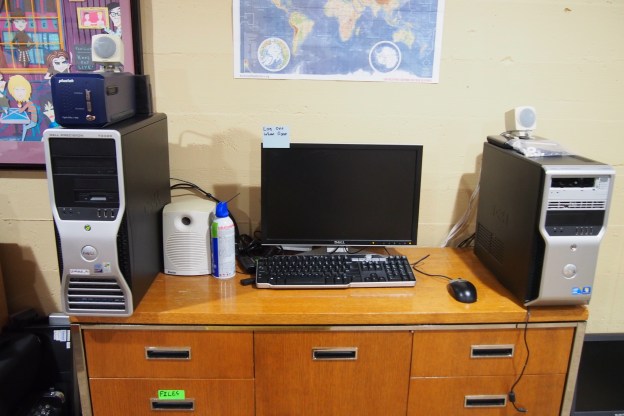
I created my first server in August 2018.  It’s a storage server that’s actually a desktop computer.  There are a few reasons I chose a Dell PC to one of my real rack-mount servers.

  1.  It’s Quiet: This might seem unimportant, but my other two servers sound like jet engines. I set this server up near the TV, and It’s on all day so having it be really loud would be an issue
  2. Disk Space: Although my Dell PowerEdge 2950 has many hard drives in it, it’s set up in a RAID configuration, meaning it really only makes use of one of the hard drives (read about RAID here).  My Dell PowerEdge 750 only holds one hard drive. Since this is a storage server, that wouldn’t work.  I chose this computer because it has six SATA (minus one because of the CD drive) ports.  That means I can put five hard drives in it!
  3. Automated Startup: The biggest issue with my real servers is they take lots of power and are made to be on all the time.  Most computers have an automated startup build in to the processor, but real servers don’t have that.  This computer did, meaning I could have it off at night.
  4. Floppy Disks! This computer has a floppy disk drive connector, and I like floppy disks.

The server (/computer) only had two spots to store a hard drive, so I had to squeeze them in wherever.  One is above the floppy disk drive, and one is zip-tied to the back of the computer.  It worked pretty well though.

I used task scheduler to give the computer an automated shutdown, and I also created another task that would run when the computer started up.  This task was for running a little program I wrote that would log every time the computer turned on.  The shutdown program I wrote also had a log (for shutdowns), just it was a bit more complicated because it also had to shut down the computer.

Estate Sale Finds: Texas Instruments TI-99/4A Home Computer

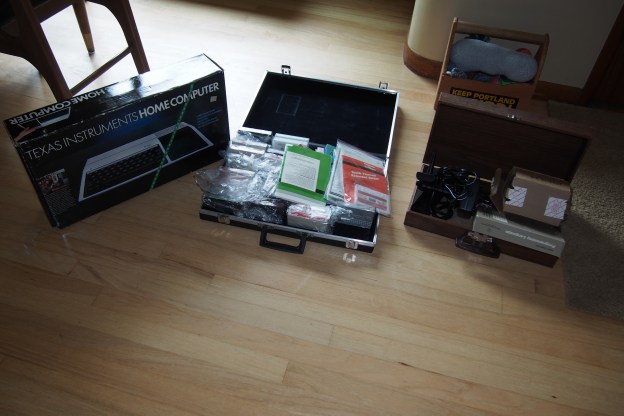
Yet another vintage computer from an Estate Sale! This time it was the not very well-known Texas Instruments (yes, the ones that make calculators) TI-99/4A home computer. If you know anything about this computer you’ll know that the computers themselves are pretty much worthless. For some reason they just aren’t worth more that $20. But, the price of the accessories for the computer are much higher, making a whole lot of Texas Instruments stuff worth quite a bit of money. So when I went to the sale, I found that the sale managers did their research and priced everything for $95 dollars. Not a bad price for the things that came with it, but I wasn’t about to spend that much on this computer. So, for the first time I left the computer behind because tomorrow would be half-price day, meaning I could get the entire setup for a nice $47.50. I was willing to do this because I don’t think there is a very high demand for old computers. So I came back early the next day, and it was still there so I grabbed it, payed the cashier, and left the sale with way more than $47 worth of Texas Instruments computer.

Once I got home, I took everything out to see what I got. The first thing I noticed, is that the computer had no scratches or scuffs on it. It looked brand new. So did the speech synthesizer add-on, which is worth more than $47 by itself. It also came with two hard to use joysticks, a bunch of games, an extended BASIC programming cartridge, a 32k RAM add-on, and some cassette tape programs I can’t use because I would need a “Program Recorder”. And yes, the computer does work.

After using this computer system, I got really into it. I think it’s better than a lot of computers of that age. I like how it has an expansion port were you can plug in upgrades. If you wanted to upgrade the RAM on let’s say a Commodore VIC-20, you would have to use the cartridge port. That mean’t you wouldn’t be able to use any cartridge programs if you had that memory upgrade in place. With the TI-99/4A, you can use cartridges while having 2,3,4 or more expansions connected. I also like the keyboard, which is better that the ever popular Commodore 64. Another good feature is that you don’t need to turn off the computer to insert a cartridge. Lastly, it has a much better picture that my Atari 800 XL, and probably many other computers too. I would recommend it too any vintage computer collector.


P.S. An event called the “Eastmoreland Garage Sale” is coming up. It’s basically a time where a bunch of people trying to sell their stuff. There are literally blocks of garage sales, so expect me to make a blog post about things I found there!


2 Vintage Computers, 1 Estate Sale.

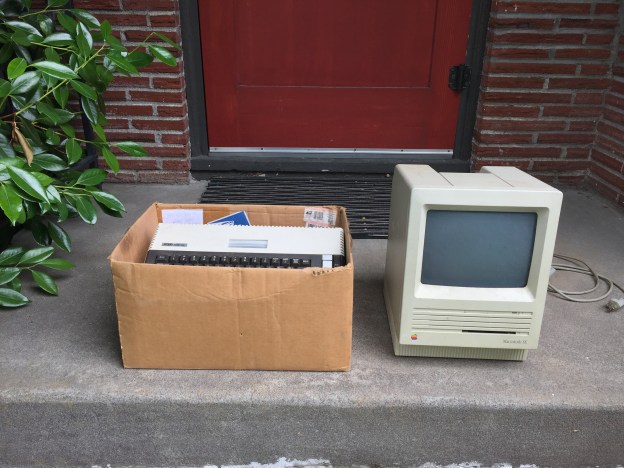
When I was looking for estate sales to go to this weekend, I found one that looked promising, but what I found there totally exceeded my expectations. Right when I went inside I saw a filthy Macintosh SE sitting in the corner of the garage. I was almost sure that it was broken, but I was pretty confident I could repair it (and it was a Macintosh SE!!! I never thought I’d own one!). It had no keyboard or mouse, but that was okay. Especially when the salesperson said it was $5. Then in a (also dirty) box, was an Atari 800 XL home computer. Not only did it have the computer, but it had 4 cartridge games, a data cassette deck, two manuals, a (kind of bad) joystick, and a TV switch box. The best part was the entire box was $25. I didn’t spend much more time at that sale, even though it had lots of cool stuff. I was way too happy that I had those computers.

When I got home, I put both computers on the front step and used a moist towel to wipe away all the dust and dirt before bringing them inside. The mac cleaned up nicer than I thought it would, which was good.

Later I proceeded to do a “Smoke Test”. A Smoke Test is basically when you just plug it in and hope it works and doesn’t start smoking. I was happy to see that the Atari 800 XL did turn on and worked fine. Sadly, the tape drive for the Atari was not working. It was time for the Macintosh. I was expecting to get some hard drive error on the screen, because usually the computer chips work, but the delicate moving parts of the hard drive are almost always dead (and expect to pay a lot of money for a working hard drive!). But, the unexpected happened. Not only did the Mac turn on, but it successfully booted from the hard drive!

The last thing I did was some more extensive cleaning on the computers (removing marks, scratches, etc.). I purchased a keyboard and mouse for the Mac on eBay, and might buy a new tape drive for the Atari in the future. This was probably the best Estate Sale I’ve gone to yet.


Atari 2600!!!

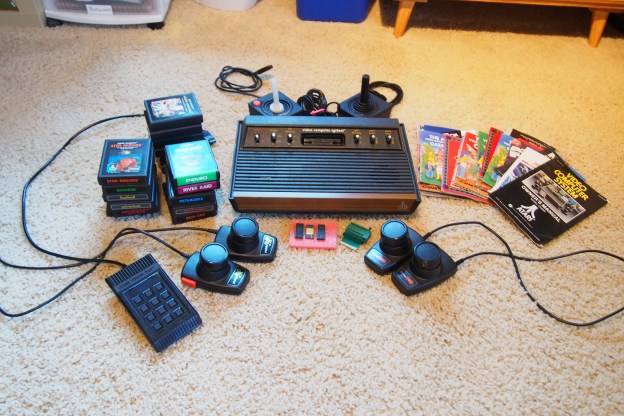
For my birthday, I asked my grandparents if I could have my dad’s old Atari 2600 video computer system. So they sent it to me, and a week later it showed up in the mail. Right when I opened the box (there were actually two boxes) I was surprised and thrilled by how much stuff there actually was. There were games, catalogs & instructions, two joysticks, 2 paddles, 2 driving paddles, a “Video Touch Pad”, and the Atari itself, which also happens to be the rarer 6-switch model.

Some people might see the computer chips in the picture and the socket they fit in. Those are actually games. Well, one is. I could not get anything from two of the chips and I noticed that one of the ones that did nothing looks a lot like an old CPU. The one working chip has casino on it, which is funny because I happen to have an empty cartridge that says casino on it. I think I know where that chip came from. The socket just plugs into the cartridge slot.

P.S. If my grandparents are reading this, thank you so much for the Atari!

Refurbishing a Texas Instruments TI-5040 Calculator

Recently at a thrift store I found this Texas Instruments TI-5040 electronic calculator. It was really dirty, but it worked fine so in this post I’m just going to talk about how I removed the marks and blemishes. The puzzling thing about this calculator is that it has the old (not original) Tektronix logo on it, but It’s clearly a Texas Instruments calculator. I originally thought it was a promotional gift, but it was built too nicely for being given away for free. My only guess is it was given to accountants who worked at Tektronix.

Anyway, I started by removing the screws on the bottom of the case. Then I removed all the keys so I could soak them in soapy water. I did not remove the electronics from the bottom for cleaning because I was worried about not being able to get the thermal print head back into place. I decided to clean the bottom half when it was all put back together. I started by moistening a paper towel and then putting a generous amount of baking soda on it. Since baking soda is a mild abrasive, when rubbed into the plastic it will remove a very small layer of the plastic, including the stains on it. It works wonders on tough stains. For everything else, I used rubbing alcohol. After I removed the stains I washed the case with soap and a toothbrush while the keys were soaking. Then I left everything to dry. Meanwhile, I vacuumed out the electronics, including the spot where the keys were. And lastly I removed the keys from their soapy bath and rinsed and dried them. Then I left them to air dry the rest of the way.

The next day, the top part of the case and the keys were dry, so I proceeded to reattach the keys and screw the case back together. Once it was put back together, I used baking soda to remove the stains on the bottom half of the case. Then I used rubbing alcohol to remove all the gunk the old cork feet left behind. Lastly I used baking soda on the cord, because it was covered in black stains. Then it was done! I reinserted the paper roll and enjoyed using my super cool retro calculator.

P.S. Sorry that I took so few pictures. I was feeling lazy.

The tape drive finally works!

I’m sure many of you remember my post called “The Tape Library Salvage Score!” (if you don’t, just scroll down the home page and you’ll see it). Anyway, In that post I talked about how I got 2 LTO Ultrium tape drives, a LTO 3 drive and a LTO 4 drive. The LTO 3 drive was broken and had the orange cleaning tape shown above stuck in it. I have taken apart and salvaged the LTO 3 drive, but I still have the working LTO 4 drive. For a while now I have wanted to back up my servers (I say this like I have many servers, but the truth is I only have two) on tape. The problem is my tape drive has SFP ports (read up!) on the back, limiting my options to doing an optical connection to my server, or just using an SFP cable. Sadly, as far as I know no servers or computers come with SFP or optical ports on the back, meaning you need to get a SFP/optical card for your server. Let me tell you, those are WAY overpriced for what they are. I’m never going to spend $300 on a little circuit board that will go in the back of my server. Since I had 5 boxed tapes and a drive, I tried (with no success) to sell them on eBay. to so I could get a couple hundred dollars (yeah, that much. Tape media is way overpriced) I could spend on something else.

Later my dad (he works in the IT department of a architecture firm) got the news that he and his other employees had to move out of there private room and go to some office cubicles in an old meeting area. Since they were downsizing, they need to get rid of a lot of stuff. And yes, this is the place I got the tape library. It just happened to be that they had a optical card sitting around that they were getting rid of. So he brought that home, and I shoved it into my server, took the tape drive and tapes out of their sad bubble-wrapped box, ripped off the “Thank you for purchasing” eBay stickers and ran downstairs with them. I did have to downgrade my server from Windows Server 2012 R2 to Windows Server 2008 Standard for it to work, but it worked. I could finally back up my stuff to tape. I will also build a case for the tape drive, because it’s an internal drive and has all it’s parts exposed. Also I have to have a whole separate ATX power supply to run it.

PoE Switches

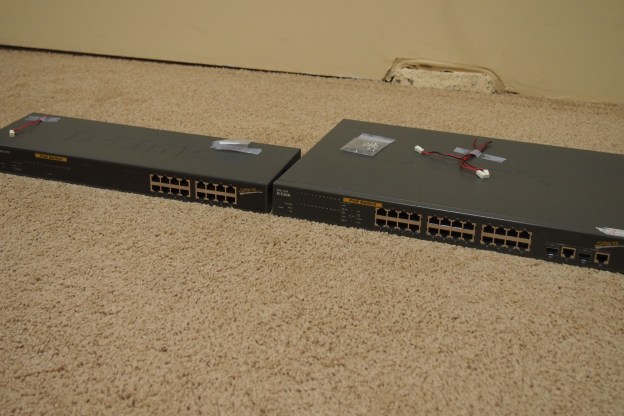
I got two old power over Ethernet (PoE) switches for free not too long ago. I have a small  16 -port switch, and a large 24-port switch. The problem with both of them is after running nonstop for 15 years the fans stopped working. An easy fix, just it’s a real pain waiting for new fans to ship from China. The large one basically has the same problem, but I heard that it had problems with the actual Ethernet switch part. If it’s not something the reset button can fix it might have to go in the salvage bin. I will give you an update once the fans come and I put then in the switch. In case you were wondering they are not gigabit switches, but they should be fast enough for me.